
Why the Mac World Is Buzzing
The tech buzz in the Mac community feels like a stadium chant: a new partnership has just unlocked the ability to run Llama AI Offline on Macs, and no internet connection is needed. Imagine typing a prompt and getting a lightning‑fast answer without a single packet leaving your MacBook—privacy lovers are doing cartwheels, developers are high‑fiving, and hobbyists are already planning their first offline experiments.
What makes this development truly special is the marriage of raw processing muscle and iron‑clad privacy. Apple’s silicon chips, already famed for their efficiency, now host Meta’s Llama model directly on the device, turning every Mac into a self‑contained AI powerhouse. There’s no cloud‑hopping, no bandwidth throttling, and absolutely no chance of your personal queries slipping through a server farm. In a world where data leaks feel like everyday news, this offline setup feels like a secret vault you can actually open and use.
The excitement isn’t just hype; it’s a concrete shift in how desktop AI will work. With Llama AI Offline on Macs, the promise is simple: you get the performance of a massive language model while keeping every thought locked inside your own hardware. The Mac world is buzzing, and the future feels both faster and far more private.
What is Llama AI Offline on Macs Partnership?
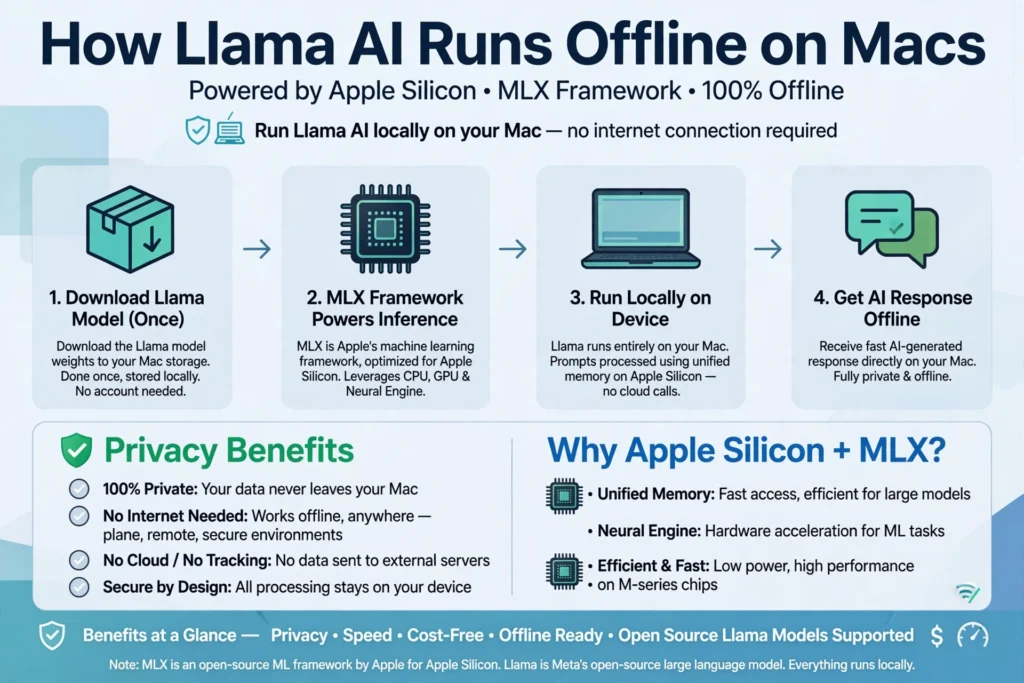
Meta and Apple have officially teamed up to ship the Llama AI model straight onto Apple Silicon, turning every Mac into a private AI powerhouse. By embedding the model at the silicon level, the offline experience feels buttery smooth: the CPU and GPU work together as if the model were a native part of macOS rather than an after‑thought add‑on.
Apple’s MLX framework acts as the clever translator that converts Llama AI Offline on Macs’ massive brain into code the Mac can execute at native speed. MLX takes care of tensor operations, memory management, and hardware acceleration, so developers and end‑users never have to wrestle with low‑level details.
The partnership’s privacy‑first promise is baked into the hardware. Every prompt you type stays inside the silicon‑secured vault, never leaving the device, never touching a remote server. This means you can ask Llama anything—from code snippets to creative prose—knowing that the data never travels beyond the encrypted confines of your Mac.
In short, Meta supplies the giant language model, Apple delivers the silicon and MLX bridge, and together they give you a seamless, offline Llama AI experience that feels both powerful and impossibly private.Official Meta Announcement:
Link: https://ai.meta.com/blog/muse-spark-open-apple-m5-ultra-mac-studio/
How to Run Llama AI Offline on Macs?
Step 1 – Grab the model
Head over to Meta’s developer portal, sign in once, and click the “Download Llama AI Offline on Macs” button. The package is a single, signed archive, so after the first click you won’t need a browser tab open. Keep the file in a folder you can easily access, like ~/Downloads/llama‑offline.
Step 2 – Install Apple’s MLX framework
Open Terminal and run:
brew install mlx If you prefer a manual install, download the .pkg from Apple’s site and follow the installer prompts. MLX is the magic sauce that lets your M‑series GPU understand Llama’s language, translating tensor operations into native macOS performance.
Step 3 – Run the offline‑setup script
Navigate to the folder containing the archive, unpack it, and execute the helper script:
cd ~/Downloads/llama‑offline
./setup_offline.sh
The script validates the model, places it in a secure sandbox, and configures MLX. No network request is made, so you can watch the progress bars dance without a single ping to the cloud.
Step 4 – Give it a test run
Launch the interactive console:
./llama_chat Type a quick prompt such as “Write a haiku about sunrise.” The response appears in milliseconds, proving that offline really can be fast. You’ve just sparked a private, lightning‑quick Llama AI session on your Mac.
Benefits of Llama AI Offline on Macs for Users
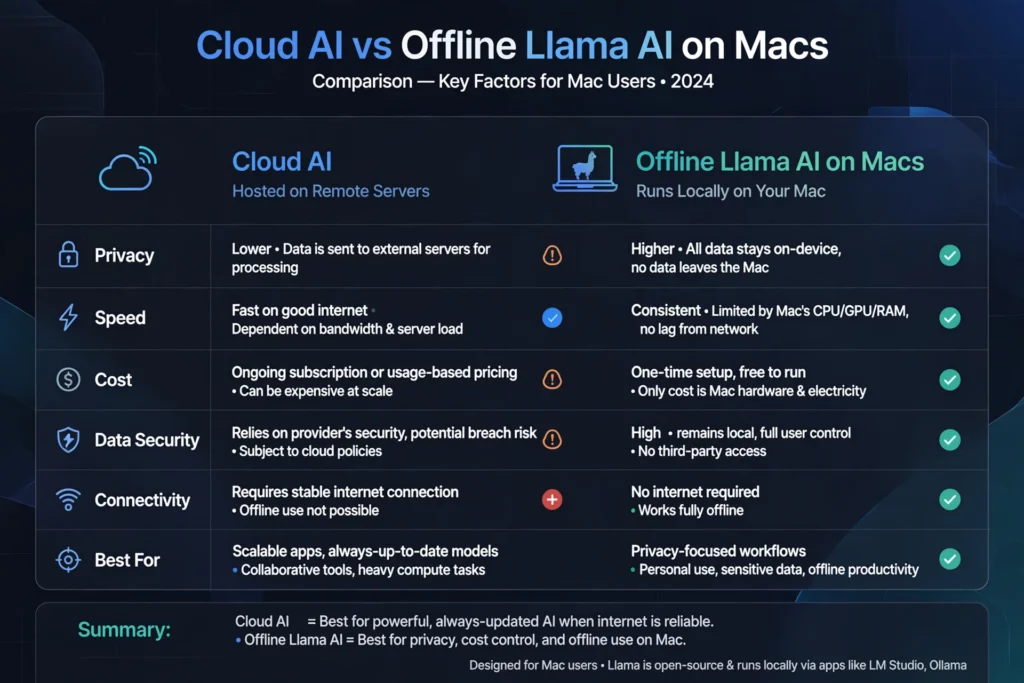
Your data never leaves the device, giving you rock‑solid privacy and peace of mind. Every prompt stays locked inside the silicon‑secured vault, so even the nosiest neighbor can’t eavesdrop. For anyone who treats personal information like a family heirloom, this is the ultimate privacy feature.
Because the model runs locally, you get lightning‑fast answers. There’s no waiting for a round‑trip to a distant server, no jitter from spotty Wi‑Fi, and no “please hold while we think” messages. The Llama AI Offline on Macs engine talks straight to your GPU, delivering responses in milliseconds and letting you stay in the creative flow.
No data leaks, no bandwidth bills, just pure, uninterrupted AI creativity at your fingertips. You can fire off as many prompts as you like without worrying about hitting a data cap or seeing hidden usage meters tick up. The experience feels like having a private AI assistant that never asks for a coffee break, never needs a subscription, and never spills your secrets. In short, you get the power of a cutting‑edge language model, the speed of native macOS, and the confidence that comes from keeping everything under your own roof.
Wrapping Up: The Future Looks Offline
The moment Meta and Apple unveiled Llama AI Offline on Macs, the script flipped on the old cloud‑first narrative. No more whisper‑quiet servers humming somewhere else, no more “wait for the response” while your Wi‑Fi fights traffic. Your Mac becomes the entire AI ecosystem: the model lives inside the silicon, the prompts never leave the metal, and the results flash back faster than you can say “Siri who?”.
This shift feels like moving from a rented desk in a bustling office to a private loft where you set the lighting, the music, and the security system. Developers can tinker, iterate, and ship features without worrying about API quotas or data‑leak compliance. Creators get a sandbox that respects every secret, from early‑stage ideas to confidential client briefs. And everyday users finally see an assistant that respects their bandwidth limits and privacy preferences, all while looking sleek on the Retina display.
In short, Llama AI Offline on Macs signals the dawn of an offline renaissance—where AI power is as personal as the Mac you already love, and the clouhttps://technoh8news.com/google-ai-mode-update-boosts-website-traffic d is an optional backdrop rather than a mandatory stage. The future is here, and it’s proudly unplugged. Also Read:
FAQ
FAQ
Can I run Llama AI Offline on Macs without internet?
Absolutely. The whole point of Llama AI Offline on Macs is to function completely offline. Once you’ve installed the model and Apple’s MLX framework, every prompt stays on your device, never leaving the silicon‑secured vault. No network requests, no cloud‑hop, just pure local processing.
Do I need a constant Apple Silicon upgrade to keep using it?
No. The current generation of Apple Silicon chips fully supports the model, and you’ll get top‑tier performance right out of the box. Future macOS updates may bring modest speed bumps, but the core capability will remain intact, meaning you won’t have to chase the newest hardware to stay in the game.
What about future compatibility?
Meta and Apple have committed to maintaining the offline pipeline, so as long as your Mac runs a supported version of macOS, the Llama AI Offline on Macs package will continue to work. You’ll benefit from any performance refinements without needing to replace your machine.
Is there any hidden data usage?
None. All computation, storage, and inference happen locally. Your queries never touch the internet, guaranteeing rock‑solid privacy.
Takeaway: Llama AI Offline on Macs delivers a truly private, high‑performance AI experience that works today and will keep working tomorrow—no internet, no hardware churn required.