
Imagine walking into a lecture hall with a laptop that breezes through note‑taking, compiles code in seconds, and renders video clips while the professor drones on. For most college and university students, that ideal machine isn’t a luxury—it’s a daily necessity. In 2026 the laptop market is no longer a single lane; it now splits into AI‑enhanced devices and the classic models we’ve known for years. AI laptops vs normal laptops This shift makes the debate of AI laptops vs normal laptops more relevant than ever, especially when you’re balancing long study sessions, group projects, and creative side‑hustles.
A traditional laptop will get you through essays, research, and most programming assignments without breaking the bank.AI laptops vs normal laptops Yet an AI laptop brings a dedicated Neural Processing Unit that can transcribe lectures in real time, boost photo and video edits, and run on‑device AI assistants without slowing down other tasks. Deciding which path to take depends on your major, budget, and how much you value built‑in AI acceleration. AI laptops vs normal laptops In the sections that follow we’ll break down the tech, compare key features, and help you figure out which kind of notebook fits your student life best.AI laptops vs normal laptops
What is an AI Laptop?
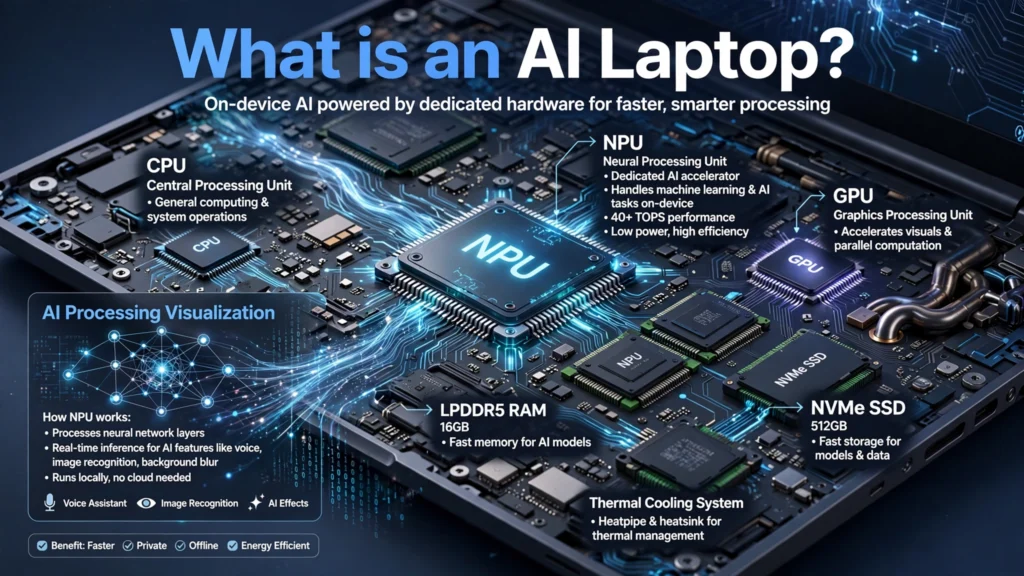
An AI laptop packs a dedicated Neural Processing Unit (NPU), a chip designed specifically for the math behind machine‑learning models. WAI laptops vs normal laptops hen you launch a real‑time transcription app, the NPU handles the speech‑to‑text calculations, so the main CPU stays free to run your notes, web browser, and any background research without hitching. The same principle applies to AI‑powered photo editors; the NPU accelerates filters, upscaling, and background removal, letting you see the finished image almost instantly. https://www.intel.com/content/www/us/en/products/docs/processors/what-is-an-npu.html
Because the NPU works like a specialized brain, code‑completion assistants such as GitHub Copilot run smoother, offering suggestions as you type without a noticeable pause.AI laptops vs normal laptops Tools that used to rely on an internet connection—ChatGPT desktop assistants, AI video enhancers, and advanced data‑science notebooks—can now operate on‑device, reducing latency and preserving privacy. In practice, you’ll notice faster response times when you ask your laptop to generate a summary of a research paper, enhance a lecture recording, or apply a neural‑style filter to a video project.
In short, the NPU offloads repetitive AI calculations, turning what used to be a heavy CPU load into a quick, efficient task.AI laptops vs normal laptops This built‑in acceleration is the core reason why many students are considering AI laptops vs normal laptops as the next step in their academic toolkit.
What is a Normal Laptop?
A normal laptop depends on the central processor and graphics chip for every operation, without a dedicated AI acceleratorAI laptops vs normal laptops For most college and university tasks this setup is more than sufficient. Word processors run smoothly, web browsers handle research and streaming, and popular IDEs such as VS Code or PyCharm feel responsive even when you compile large projects. Standard media editing—cropping photos, cutting video clips, adding subtitles—uses the GPU and works well for assignments or hobby videos.

Because the design is simpler, normal laptops tend to be priced lower than their AI‑enhanced counterparts.AI laptops vs normal laptops You’ll find a broad range of models from many manufacturers, giving you flexibility to match your budget and style. The lack of an extra chip also means there are fewer proprietary components, which translates into easier upgrades: AI laptops vs normal laptops swapping RAM, adding an SSD, or even replacing the battery is often straightforward. Repairs are generally cheaper too, since most service centers are familiar with the common parts.
In short, a normal laptop covers the classic student needs, offers more choices, and fits tighter budgets, making it a solid baseline when you compare AI laptops vs normal laptops.
AI vs Normal – 5 Key Differences
Below is a quick comparison table that highlights the most important factors for students:
| Feature | AI Laptop | Normal Laptop |
|---|---|---|
| Price | Higher (often $1,200‑$2,500) | Lower (usually $600‑$1,200) |
| Performance | NPU accelerates AI workloads; better for real‑time translation, AI video upscaling, and large‑scale data analysis | Strong CPU/GPU for traditional tasks; may struggle with heavy AI software |
| Battery Life | NPU can be power‑efficient for AI tasks, but high‑performance models may drain faster under constant AI use | Typically longer battery life for everyday tasks because fewer specialized chips |
| Features | Built‑in voice assistants, AI‑driven screenshot tools, on‑device inference, advanced security (face‑unlock with AI) | Standard features: webcam, Wi‑Fi, Bluetooth, basic security |
| Future‑Proof | More ready for upcoming AI‑centric apps and curricula | May need an upgrade sooner if AI tools become core to coursework |
In practice, the price gap reflects the added hardware of a dedicated neural chip and the software ecosystem that comes with it. Performance gains are most noticeable when you run local AI models, such as code‑completion assistants or AI‑enhanced video editors; ordinary laptops handle those same tasks only by offloading to the cloud. Battery life can swing either way—an efficient NPU saves power on AI work, yet power‑hungry models can shorten runtime during continuous AI processing. Feature sets differ: AI laptops often ship with on‑device inference and smarter security, while normal laptops stick to the basics. Finally, the future‑proof argument hinges on how quickly your curriculum adopts AI tools; a normal laptop may require a sooner upgrade if AI becomes a daily requirement.
Which One Should Students Buy?
If you’re leaning toward an AI‑enhanced machine, consider these scenarios:
- Your major includes AI, data‑science, or computer‑vision courses; the dedicated NPU will speed up model training and real‑time inference.
- Your projects require on‑device AI, such as local speech‑to‑text, image enhancement, or code‑completion assistants that run without an internet connection.
- You frequently edit video or audio with AI plugins for auto‑color grading, background removal, or smart mastering; the hardware acceleration keeps rendering times low.
- You want a laptop that stays relevant as AI tools become a staple in classrooms and internships, reducing the need for an upgrade in the next few years.
On the other hand, a normal laptop makes more sense when:
- Your budget is tight; you can get a solid device for under $1,200 that still handles programming, writing, and web research comfortably.
- Your workflow relies on cloud‑based AI services, so most heavy calculations happen on remote servers rather than locally.
- Long battery life is a priority for all‑day campus use; fewer specialized chips often translate to longer runtimes between charges.
- Your coursework focuses on traditional subjects—literature, business, engineering basics—where standard CPU/GPU performance is sufficient.
Weigh your curriculum, financial constraints, and how much you value built‑in AI acceleration before deciding between AI laptops vs normal laptops.
Final Verdict
For most students a regular laptop handles the basics—writing papers, coding, streaming lectures, and light video editing. Its lower price lets you buy a decent CPU, enough RAM, and a solid battery without breaking the budget. Relying on cloud‑based AI means the absence of an NPU rarely hurts, and you still get long runtimes.
If your field focuses on AI, data science, computer‑vision, or you frequently use AI‑enhanced editing tools, an AI laptop’s extra cost can be worthwhile. An on‑device neural processor offers local inference, low latency, and future‑proofs your machine for upcoming coursework, translating into faster, smoother work.
In short, match the laptop to your curriculum, financial limits, and how much built‑in AI acceleration you need. The right choice emerges when you weigh those factors.
Also Read : On-Device AI Smartphone: How Phones Think Without Internet in 2026